










Latest scanner updates
We added AI to the Website Scanner and URL Fuzzer in the exact spots where deterministic logic used to give up. Three enhancements shipped:
AI-assisted authentication: when authentication fails to identify a login form the usual way, an AI fallback steps in to find it, so complex login flows stop cutting scans short.
Flowmapper: an AI agent explores your site like a real user, filling forms and following flows to reach endpoints the regular spider misses, then adds them to the scan.
ML Classifier: filters out fake “not found” pages that return a 200 status, so the admin console, sensitive file, and information disclosure checks report real findings instead of error pages in disguise. The URL Fuzzer runs the same classifier, so its results list only the files and directories that actually exist.
Why it matters
Fewer false positives and fewer missed endpoints, without manual tuning. The AI handles the judgment calls that used to break scans or bury real findings in noise.
How to use
Everything is on by default. You can disable any or all of it under My account, then AI.
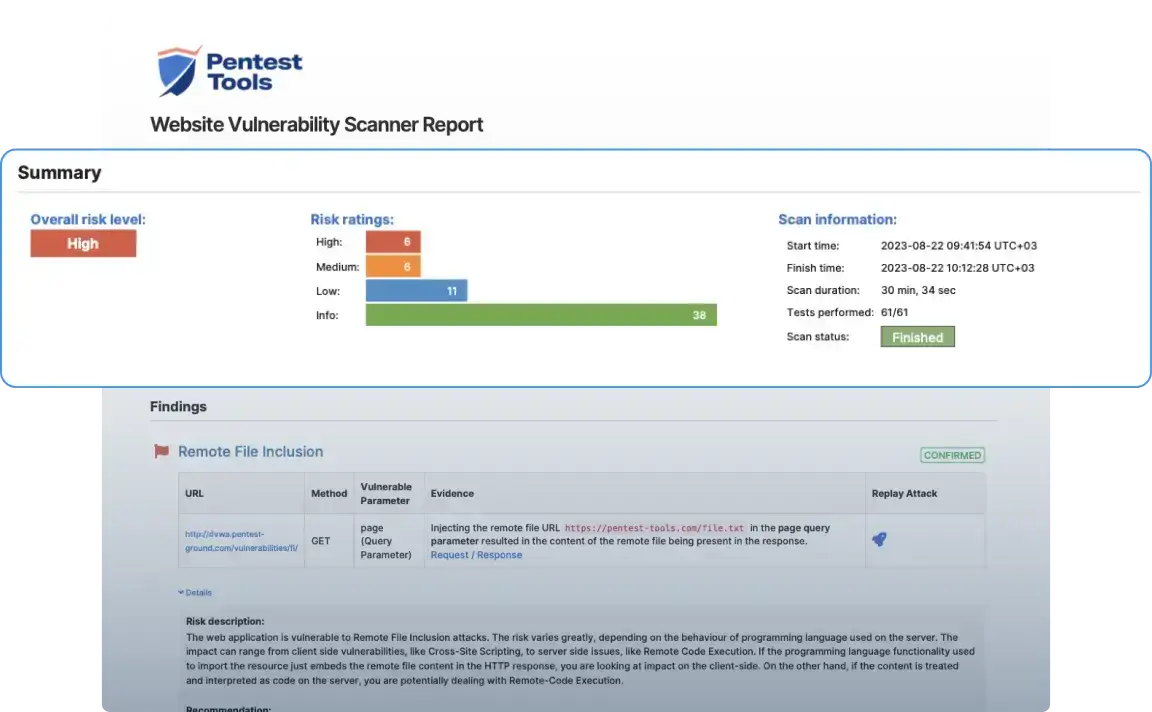
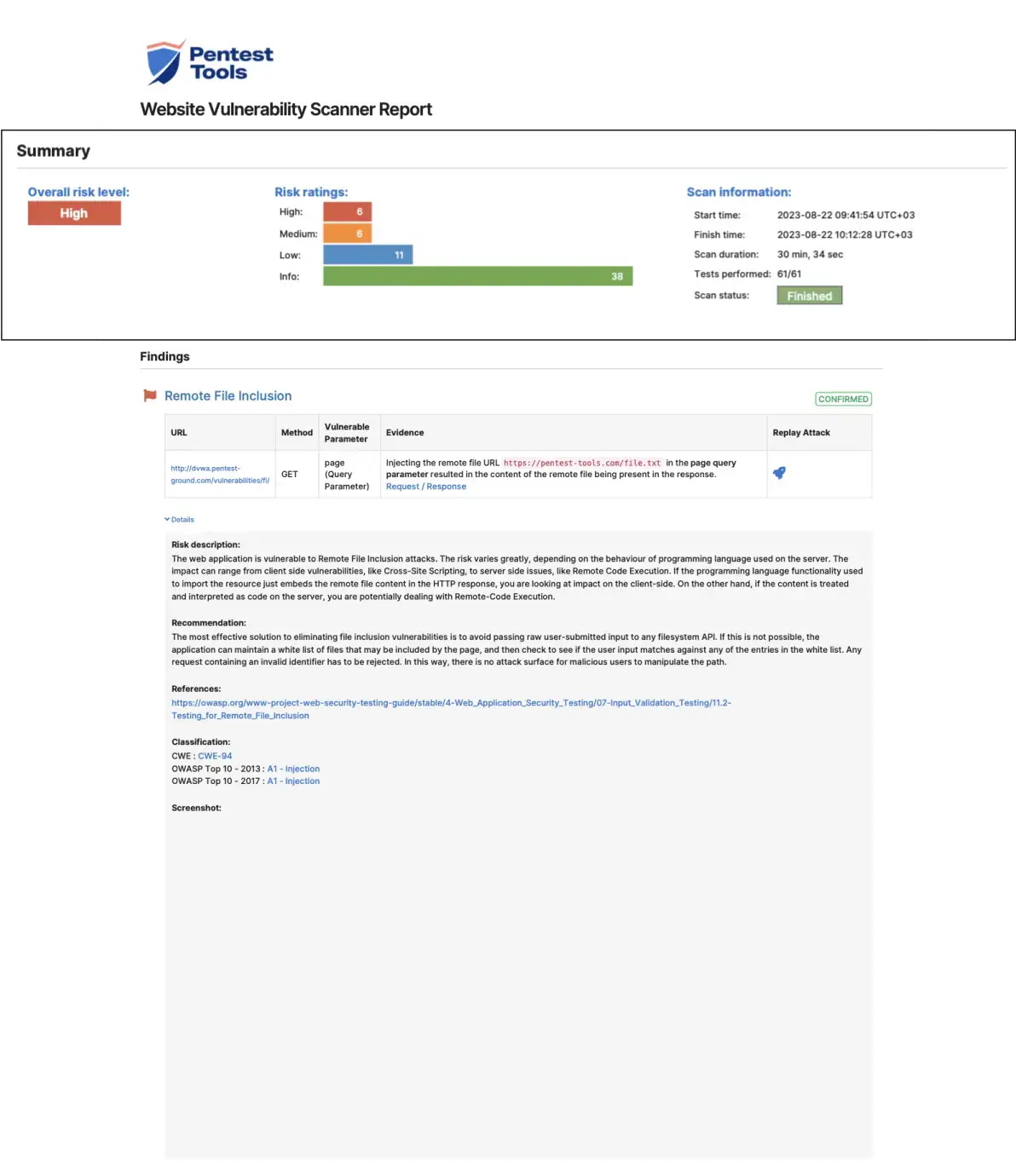
Sample Website Vulnerability Scanner report
This sample report from our scanner shows the main sections it includes, the look and feel, plus the level of detail for the findings.
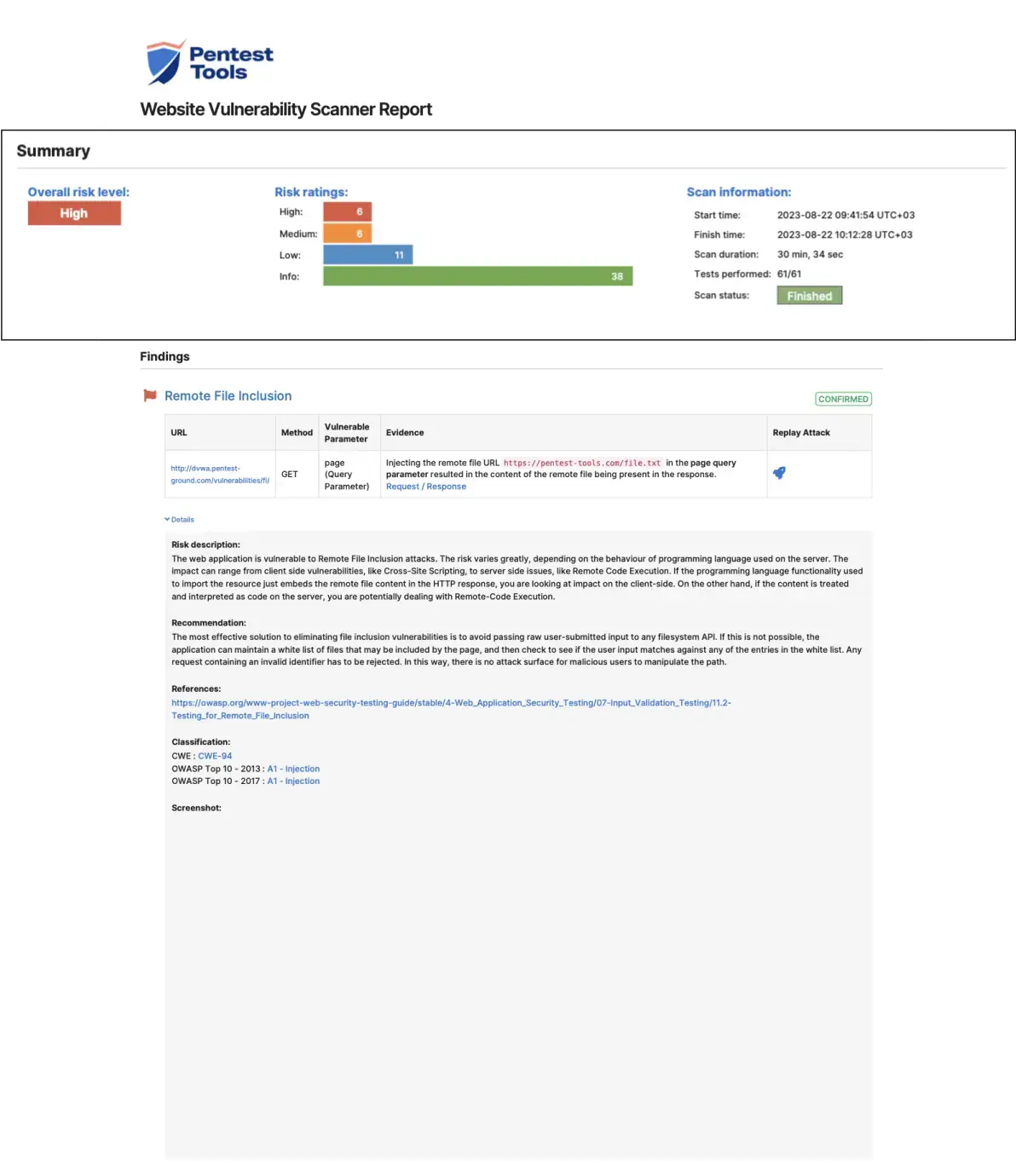
This section provides a helpful overview of the findings and a visual representation of risk levels across all identified vulnerabilities.
How does the Website Vulnerability Scanner work?
The Website Vulnerability Scanner is a DAST (Dynamic Application Security Testing) tool which tries to discover vulnerabilities like XSS, SQL injection, HTTP Prototype Pollution, Directory Traversal, and more in running web applications.
The scanner interacts with the target application by sending numerous HTTP requests with specific payloads. If the application is vulnerable, these payloads will determine the code to behave abnormally, informing the scanner that a vulnerability exists.
Use this tool from your command line interface
If you prefer it, we also provide a CLI version of our Website Vulnerability Scanner. Through the Pentest-Tools.com CLI, you can run Light scans against your web apps and start gathering insights for your next move.
1. Installation
curl -s https://pentest-tools.com/cli-scan/linux/ptt.zip -o /tmp/ptt.zip
unzip /tmp/ptt.zip -d /tmp/ptt
chmod +x /tmp/ptt/main
sudo mv /tmp/ptt/main /usr/local/bin/pttIf you have docker or pip installed, you can use them to get ptt-scan:
docker run --rm -it pentesttoolscom/ptt-scan:latest run website_scanner https://pentest-ground.com:81/2. Usage
Quickstart: Run the following command in your terminal/command line to find the vulnerabilities of your website.
ptt run website_scanner <target_url>You can learn more options with the -h flag:
ptt -h1. Installation
curl -s https://pentest-tools.com/cli-scan/linux/ptt.zip -o /tmp/ptt.zip unzip /tmp/ptt.zip -d /tmp/ptt chmod +x /tmp/ptt/main sudo mv /tmp/ptt/main /usr/local/bin/pttIf you have docker or pip installed, you can use them to get ptt-scan:
docker run --rm -it pentesttoolscom/ptt-scan:latest run website_scanner https://pentest-ground.com:81/2. Usage
Quickstart: Run the following command in your terminal/command line to find the vulnerabilities of your website.
ptt run website_scanner <target_url>You can learn more options with the -h flag:
ptt -h
It's really easy to scan your web application for vulnerabilities
No setup required
Being a cloud-based scanner, it just works out of the box. There’s no need to install anything on your end to scan public-facing web applications. Just create an account and start scanning.
Scheduling
It’s a really good idea to scan your web applications periodically since new vulnerabilities appear every day. With Pentest-Tools.com, you can schedule daily, weekly, monthly or quarterly scans against your web apps and automatically get reports via email or other channels when risks emerge.
API access
Many of our customers prefer to trigger scans programmatically, through our REST API. This lets you integrate our scanner with your internal processes (CI/CD, data sources, custom applications) and reduces manual scanning work.
Internal scanning
You can also use the Website Vulnerability Scanner to detect vulnerabilities in applications hosted on internal networks, intranets, private clouds, or restricted network segments. A quick and easy VPN Agent setup routes the traffic from our servers to your internal network and gets you ready to scan.
Integrations
We know your security team loves their tools. So, we made sure ours plays nicely with favorites like Jira, Slack, Email, and Webhooks. Just set your rules and get your results automatically on any of these platforms when the scans are done.
Customer reviews
Pentest-Tools.com is my team's first go-to solution. Anytime we are preparing to deploy a new version of our software, we run many tools to monitor and secure our environment, but the simplicity and ease we have with Pentest-Tools.com to run network and web server scans to highlight issues is unmatched.
Michael Dornan
CEO at Tili Group
Israel 🇮🇱





Common questions about web vulnerability scanning
A web vulnerability scanner is a specialized software tool designed to automatically identify security flaws within web applications. A reliable, robust website security scanner should be able to mimic real attacker tactics and identify realistic, exploitable security issues.
Our Website Vulnerability Scanner is a robust example of this type of tool, offering a comprehensive scan that identifies threats and also validates them to reduce false positives.
It works by interacting with the target application, sending a series of HTTP requests with specific payloads, and analyzing the responses to detect potential vulnerabilities such as Cross-Site Scripting (XSS), SQL injection, and other pressing security issues and misconfigurations.